⚠Ver este post na versão em Português↗
Diagnosis:
In some situations it is necessary to adjust / manipulate the formula “Today“, usually TODAY() according to a specific Time Zone. It is common to happen in companies that have headquarters in different continents.
In other words, it occurs when the Power BI Corporate Gateway server (Microsoft portal) is in a different time zone of who will View the Dashboard (end user, etc.)
In this way, the result will be incorrect, and depending on the time to be displayed, may represent even another date, because the formula “Today” refers to another time zone, in the example Brazil-Europe, difference of 03:00h
Solution summary:
Get the universal date/time (UTC), and then subtract the time zone
Solution🙂:
Before continue, subscribe, it’s free! Follow on social media
After this introduction, I will show you the solution for your problem🤝, in DAX and Power Query M language.
DAX:
Create a new Measure in “Home” → “New measure”:

Insert the code below:
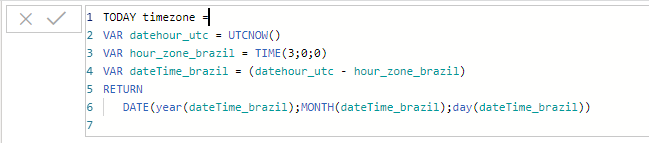
TODAY timezone =
VAR datehour_utc = UTCNOW()
VAR hour_zone_brazil = TIME(3,0,0)
VAR dateTime_brazil = (datehour_utc - hour_zone_brazil)
RETURN
DATE(year(dateTime_brazil),MONTH(dateTime_brazil),day(dateTime_brazil))
Power Query M:
Create a new “Blank query” in “Home” → “Get data” → “Blank query”

Go to “Home” → “Advanced Editor”:
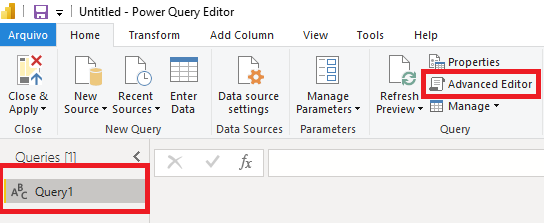
Insert the code below:

let
    DataServidor     = DateTimeZone.ToUtc(DateTimeZone.UtcNow()),
    DataServidor1    = DateTimeZone.SwitchZone(DataServidor,-3),
    TransTabela      = #table(1, {{DataServidor1}}),
    RenomeiaColuna   = Table.RenameColumns(TransTabela,{{"Column1", "Ultima Atualização"}}),
    #"Tipo Alterado" = Table.TransformColumnTypes(RenomeiaColuna,{{"Ultima Atualização", type datetimezone}}),
    #"Primeiros caracteres extraídos" = Table.TransformColumns(#"Tipo Alterado", {{"Ultima Atualização", each Text.Start(Text.From(_, "en-US"), 19), type text}}),
    #"Tipo Alterado1" = Table.TransformColumnTypes(#"Primeiros caracteres extraídos",{{"Ultima Atualização", type datetime}})
in
    #"Tipo Alterado1"
Note
Pay attention to regional settings, as shown below, example “en-US”:

If your region is not US, use the code below:
let
    DataServidor     = DateTimeZone.ToUtc(DateTimeZone.UtcNow()),
    DataServidor1    = DateTimeZone.SwitchZone(DataServidor,-3),
    TransTabela      = #table(1, {{DataServidor1}}),
    RenomeiaColuna   = Table.RenameColumns(TransTabela,{{"Column1", "Ultima Atualização"}}),
    #"Tipo Alterado" = Table.TransformColumnTypes(RenomeiaColuna,{{"Ultima Atualização", type datetimezone}}),
    #"Primeiros caracteres extraídos" = Table.TransformColumns(#"Tipo Alterado", {{"Ultima Atualização", each Text.Start(Text.From(_), 19), type text}}),
    #"Tipo Alterado1" = Table.TransformColumnTypes(#"Primeiros caracteres extraídos",{{"Ultima Atualização", type datetime}})
in
    #"Tipo Alterado1"
Keywords: Date; DateTimeZone; Time Zone; UTCNOW(); UTC; UTCNOW; TODAY(); DateTimeZone.SwitchZone; DateTimeZone.ToUtc; DateTimeZone.UtcNow; Time; Switch Zone; datetimezone; PBI; Power BI; Power Query M; Date Time Zone; power bi today() timezone; datetimezone power bi; today power bi
Did you like the content? Want to get more tips? Subscribe for free!
Follow on social media:
- How to Find Deleted VTTK Transport in SAP ECC
 Bem Vindo! | Welcome! By Felipe Lamounier, Minas Gerais, Brasil🇧🇷 – powered by 🙂My Easy B.I. 📑 Table of Contents: Introduction In this post, we will learn how to identify which transports were deleted in SAP ECC. We will also see how this data is removed from the VTTK table over a specific period. InContinuar lendo “How to Find Deleted VTTK Transport in SAP ECC”
 - How to identify SAP BW Process Chains with Recurring Errors
 This post by Felipe Lamounier focuses on identifying recurring errors in Process Chains (RSPC) within SAP BW over a 65-day period. It provides a structured approach to filter and analyze execution logs, aimed at improving resource management and system efficiency by addressing improperly executed chains. The analysis concludes with recommendations for maintaining or removing chains based on error frequency.
 - How to Retrieve SAP Table Metadata Efficiently
 This post by Felipe Lamounier provides a guide on efficiently retrieving metadata from SAP table fields using transaction SE16 and the DD03M view. Key elements include data element, data type, field length, and descriptions. Additionally, the post lists important SAP system tables, enhancing understanding of SAP metadata extraction.
 🙂My Easy B.I.
3 comentários em “📆🕓Power BI: How to adjust “TODAY” formula according to Time Zone”