⚠ Ver este post na versão em Português ↗
Welcome!
By Felipe Lamounier, state of Minas Gerais, Brazil – powered by 🙂My Easy B.I.
In this article I will teach you how to force the closure / conclusion of a process chain in the BW using a standard function module (SE37)
Some of the main points covered in this article:
- Table RSPCPROCESSLOG
- Step by step how to use the BW function module RSPC_PROCESS_FINISH
- Step by step how to use the BW report RSPC_PROCESS_FINISH
📑 Table of Contents:
Diagnosis:
We occasionally encounter SAP BW with a process chain (RSPC) or its internal processes (load, activation) that the system is unable to close or complete.
These loads have the status “In progress” (yellow light) “ad aeternum”, and not even a manual intervention by the user can do the closure or conclusion. This way, the process chain stays in a kind of “limbo” in the environment.
Solution summary:
Force the closure of a Process Chain (or they internal processes) in SAP BW that stayed in “limbo” through the standard function module “RSPC_PROCESS_FINISH”
🔭 See also:
Solution – function RSPC_PROCESS_FINISH
Before continue, subscribe, it’s free! Follow on social media
First step is to find the process chain log ID in the Log View (Shift + F1), RSPC transaction, as shown below:

In this example, the log ID is “5NOGU1X3U75CVQ24YVH4LN2FX”
Go to transaction SE16, access the table “RSPCPROCESSLOG”:
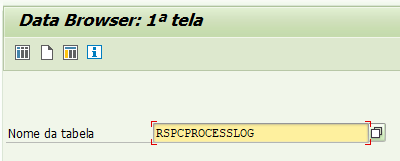
In the LOG_ID field of the RSPCPROCESSLOG table, enter the process chain log ID and choose Execute (F8):
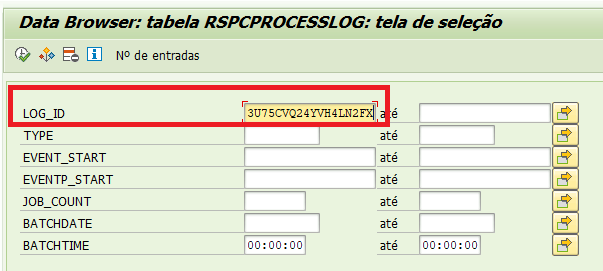
The fields required as mandatory parameters in the function module will be as follows:
LOG_ID: LOG ID of the process chain
TYPE: Process type
VARIANTE: Variant technical name
INSTANCE: Instance name
STATE: Current process status

⚠ Note that the VARIANT field is the process that you want to end (load, process chain, activation, etc.)
⚠ Note that the STATE is the current state that will be modified in the function module
Go to transaction SE37, function module RSPC_PROCESS_FINISH
Insert the mandatory values:
I_LOGID = RSPCPROCESSLOG-LOG ID
I_TYPE = RSPCPROCESSLOG-TYPE
I_VARIANT = RSPCPROCESSLOG-VARIANTE
I_INSTANCE = RSPCPROCESSLOG-INSTANCE → ⚠ If no instance name is in the table give SPACE.
I_STATE: Desired status of the process chain (see list below).
⚠ Status list for the I_STATE parameter:
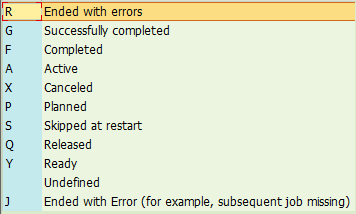
Example of filling in the function parameters:
We recommend I_STATE = R

Run the function to change the Status of the Process Chain to the desired status (Closed, Completed, etc.).
Simple and easy🙂
SE38 – Report: RSPC_PROCESS_FINISH
There is also the RSPC_PROCESS_FINISH report that you can use instead of making a function module. The parameters that are entered are the same as the function explained above.
Go to SE38 tcode and call the report RSPC_PROCESS_FINISH:

Conclusion:
In this article you learned how to solve the problem when some process is blocked in the process chain, using the RSPC_PROCESS_FINISH function or program.
In this step-by-step, we consult the log of the RSPCPROCESSLOG table, in order to get the necessary parameters to fill the RSPC_PROCESS_FINISH function/report
See too: 🧙BW: How to generate Automatic Query for an InfoProvider ↗
Keywords: SAP BW; BW; SE37; RSPC; Process Chain; RSPC_PROCESS_FINISH; RSPCPROCESSLOG; rspc_process_finish step by step; rspc process finish; How to force the closure of a Process Chain in BW; step by step close process chain; bw function to finish process chain; How to Terminate Process Chain in SAP BW; RSPC_PROCESS_FINISH How to End Process Chain in SAP BW; how to stop process chain in sap bw; process chain stuck in yellow status; sap bw cancel process chain
Did you like the content? Want to get more tips? Subscribe for free!
🚀How about going deeper and knowing the tables, transactions and useful functions that nobody tells you?
All of this is in our eBook! Visit on amazon.com ↗
Follow on social media:
- How to Find Deleted VTTK Transport in SAP ECC
 Bem Vindo! | Welcome! By Felipe Lamounier, Minas Gerais, Brasil🇧🇷 – powered by 🙂My Easy B.I. 📑 Table of Contents: Introduction In this post, we will learn how to identify which transports were deleted in SAP ECC. We will also see how this data is removed from the VTTK table over a specific period. InContinuar lendo “How to Find Deleted VTTK Transport in SAP ECC”
 - How to identify SAP BW Process Chains with Recurring Errors
 This post by Felipe Lamounier focuses on identifying recurring errors in Process Chains (RSPC) within SAP BW over a 65-day period. It provides a structured approach to filter and analyze execution logs, aimed at improving resource management and system efficiency by addressing improperly executed chains. The analysis concludes with recommendations for maintaining or removing chains based on error frequency.
 - How to Retrieve SAP Table Metadata Efficiently
 This post by Felipe Lamounier provides a guide on efficiently retrieving metadata from SAP table fields using transaction SE16 and the DD03M view. Key elements include data element, data type, field length, and descriptions. Additionally, the post lists important SAP system tables, enhancing understanding of SAP metadata extraction.
 🙂My Easy B.I.
thanks. very helpful!
CurtirCurtido por 1 pessoa
Thanks
CurtirCurtir