Welcome!
By Felipe Lamounier, state of Minas Gerais, Brazil – powered by 🙂My Easy B.I.
📚E-book: SAP BW and 2LIS Delta DataSource: How to Enhance without ECC PRD system downtime and Delta lost ↗ [The secret that not even SAP teaches you!]
🚀Go to↗ amazon.com
🔭 See also:
📑 Index:
Pay Attention – Important Notes about the entire process!
Introduction
⠀⠀Introduction to this book
⠀⠀Introduction to 2LIS Delta mechanism
⠀⠀Introduction to example covered in this book
From this point, Start the Deployment!
Setup Table
LBWE – Stop Job from MCEX Queue to RSA7
LBWQ – Move data from MCEX queue to RSA7 queue
BW – Load delta from RSA7 to BW
Pay Attention – Important note starting from this point
ECC – Transporting Request to ECC PRD environment
ECC – After the Request has been transported to ECC PRD – Step 1
ECC – After the Request has been transported to ECC PRD – Step 2
BW – Transporting Request to ECC PRD environment
Return to ECC – After the Request has been transported to BW PRD
ECC – Recovery Lost Delta Data
⠀⠀Introduction to Recovery Lost Delta Data
⠀⠀MCEX02 – Purchasing
⠀⠀MCEX04 – Shop Floor Control (PP)
⠀⠀MCEX05 – Quality Management
⠀⠀MCEX06 – Invoice Verification
⠀⠀MCEX08 – Shipment
⠀⠀MCEX11 – SD Sales
⠀⠀MCEX12 – LE Shipping
⠀⠀MCEX13 – SD Billing
⠀⠀MCEX17 – Plant Maintenance
Bonus
⚠ Pay Attention – Important Notes about the entire process!
I strongly recommend you perform the steps content in this book together BASIS consultant.
Some SAP transactions, options, or feature need authorizations in the PRD environment that the BW consultant may can’t have.
This proceed do not works with MCEX03 structure, extractors related to Stock.
📖 Introduction
Introduction to this book:
In this book you will learn how to enhancement a 2LIS Delta Extractors without the need of ECC system downtime, in other words, without lock out users or batch jobs. The process covered in this book ensure that data (delta queue) will be recovered, and you won’t have Delta lost.
The key spot and the focus in this book are performing the deploy keeping the PRD system running normally, without collateral effects on delta loads. Is expected a minimal familiarity about the 2LIS Delta process. Is also expected that you already enhanced your 2LIS extractor in the DEV environment.
Introduction to 2LIS Delta mechanism:
Before performing the Step-by-step contained in this book, let’s get a briefing of the delta mechanism. Understand this is important to guide the entire process.
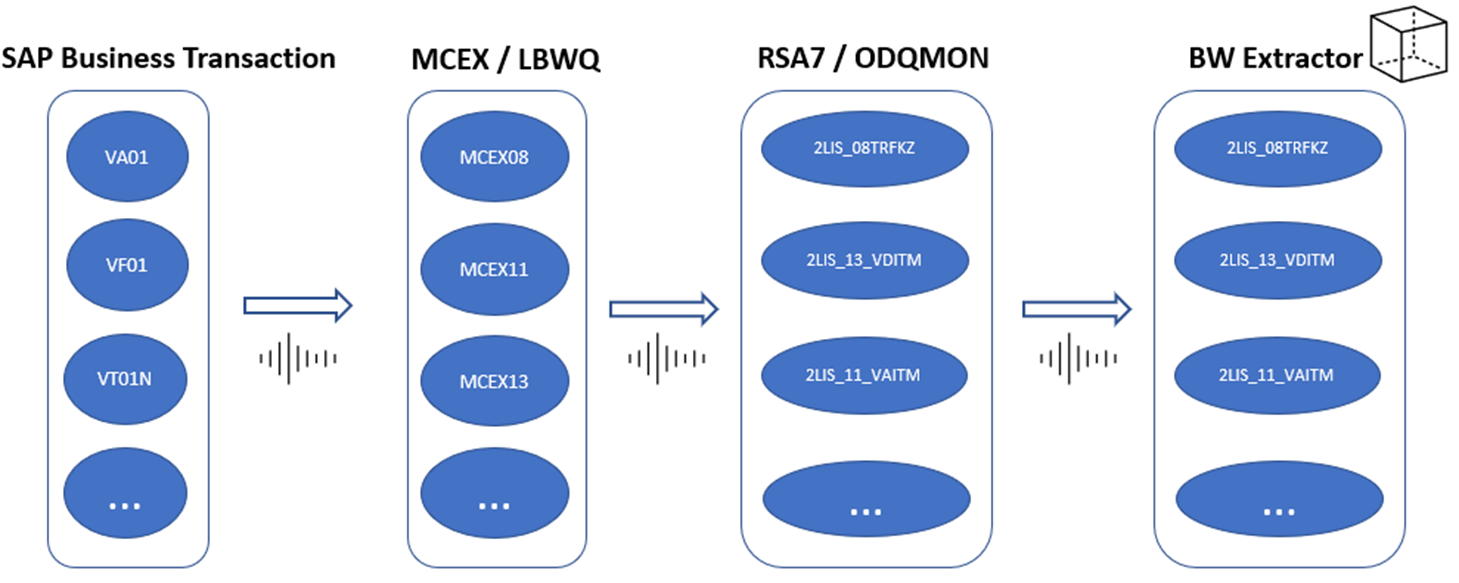
Basically, there are 4 drivers leading the Delta mechanism, each one triggering the next:
- SAP transaction (tcode)
- LBWQ queue (MCEX structure queue),
- RSA7/ODQMON
- Extractor (DataSource) loading data to target system (BW)
The first trigger happens when some document is created, modified, or deleted through an SAP transaction (tcode). Example when the user modifies a Sales Order in the VA02 ECC tcode. Automatically, the modification is stored into respective MCEX delta structure, named LBWQ queue, as a Delta record.
The next step is moving the delta record from MCEX queue to BW Delta queue (RSA7 or ODQMON). This step needs to be activated in the LBWE tcode, setting up the Batch Job that will move the data. The last step is run the Delta InfoPackage into BW to move the data from Delta Queue (RSA7 or ODQMON) in the source system (ECC) to target system (BW) and so, the cycle of that record that was originated at modification of sales order document is finished.
Introduction to example covered in this book:
In this book was chosen the extractor 2LIS_08TRFKZ as example. It was enhanced and the step by step about the enhancement was not described in detail as mentioned in the introduction to this book. As informed, the key spot and the focus in this book is performing the deploy without system downtime or users locked.
However, I will quickly show you how to do a simple default enhancement:
Access the SAP ECC tcode LBWE and click on “Maintenance”:

A new window will open, select the field, and click on “Choose” (arrow left) and “Continue” (Enter):

After, return to main screen and click on name of the DataSource:

A new window will open, “DataSource: Customer version Display”. Click on “Save”:

After this, go to RSA6 tcode, seek the DataSource, select it and click on “Change DataSource” (Ctrl+Shift+F1). At the next window, click on “Save”:

Want to learn more? Access our area 🎓🚀Training&Education↗
🏁 From this point, Start the Deployment!
⚠ From this point, the deployment in the PRD environment will start. Is expected that you have already enhanced your DataSource and transported the Requests to DEV and QAS environment.
Setup Table:
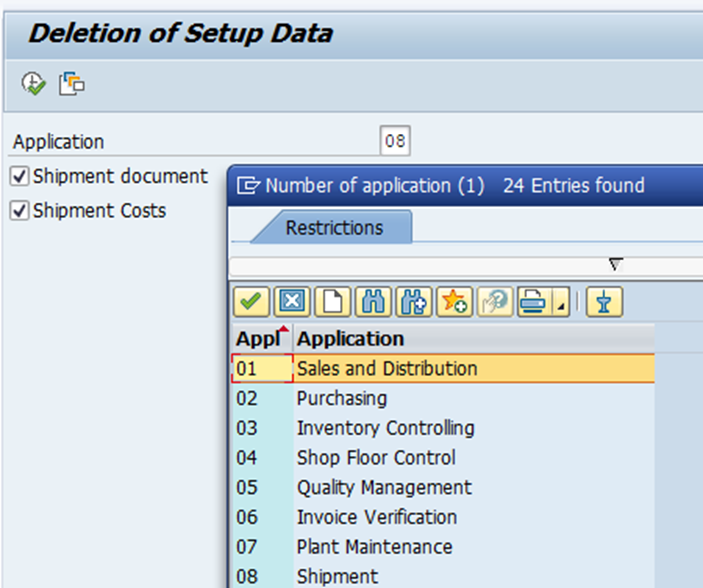
In the SAP ECC, go to LBWG tcode, “Delete Setup Table”.
Choose the queue and Execute (F8):
In SE16 tcode, Check if content of the Setup Table was deleted. Search for “MC*SETUP” to find the related:

Realize that 0 Number of entries in the table:

The next step is to stop the LBWE Job that take the data from MCEX Queue to RSA7 Delta Queue.
The reason is because at moment the Request will be transported to PRD system, the RSA7 queue must be empty.
LBWE – Stop Job from MCEX Queue to RSA7:
In ECC environment, run LBWE tcode and click on “Job Control” option:

And then, “Job overview…” option:

A list of all Jobs will be show. We need to find the Job related the Extractor DataSource 2LIS that you are enhancement. In that example case, 2LIS_08TRFKZ.
Press CTRL+F (Find) e seek by “LIS-BW-VB_APPLICATION_08”, where the last two characters match the extractor number (08):
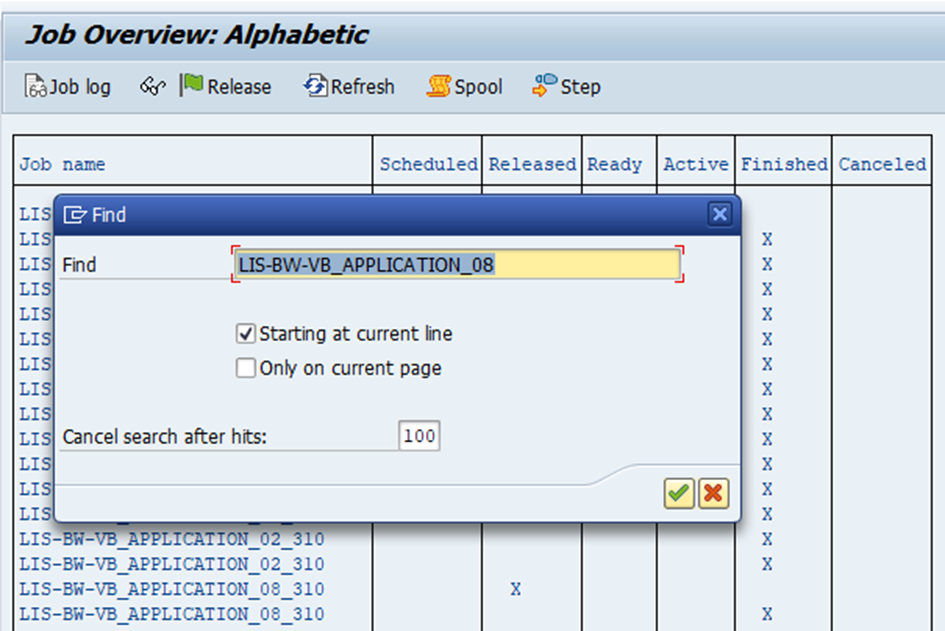
Select the “Job” which is marked as released:
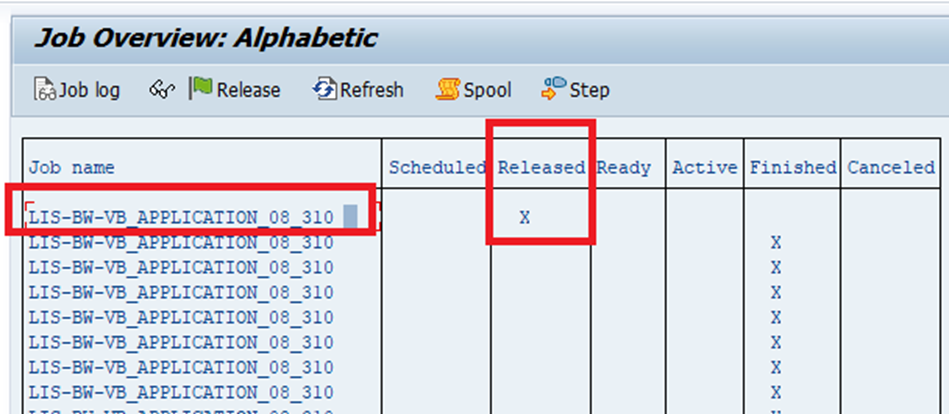
We must change the status of the job from “Released” to “Schedule”. The reason is avoiding the Job execution while the Request is carrying on to PRD.
To do this, select the corresponding job, by clicking at his line and the Menu “Job”à “Schedule Job”à “Undo”:

In this way, we ensure the non-execution of the job until the Request will be transport to PRD environment.
LBWQ – Move data from MCEX queue to RSA7 queue:
Now, the objective is move/take the data from MCEX queue to RSA7 queue.
Access LBWQ tcode and note there are records in the MCEX08 queue:

Basically, there are 2 ways to move that data to RSA7 and you can choose one you like. The options are run a Report (SE38) or created an eventual Job to do this. Below will show you the options:
- Option 1: Execute the Report that move the data, accessing SE38 tcode.
Each MCEX queue has your own report. Below, the list:
MCEX02: RMBWV302
MCEX03: RMBWV303
MCEX04: RMBWV304
MCEX05: RMBWV305
MCEX06: RMBWV306
MCEX08: RMBWV308
MCEX11: RMBWV311
MCEX12: RMBWV312
MCEX13: RMBWV313
MCEX17: RMBWV317
- Option 2: Create an eventual Job and execute it:
Return to Job Overview List (from LBWE), and select the Job that you changed to “Schedule” and Menu “Job” à “Copy”:

Give a Job name you prefer and copy it:
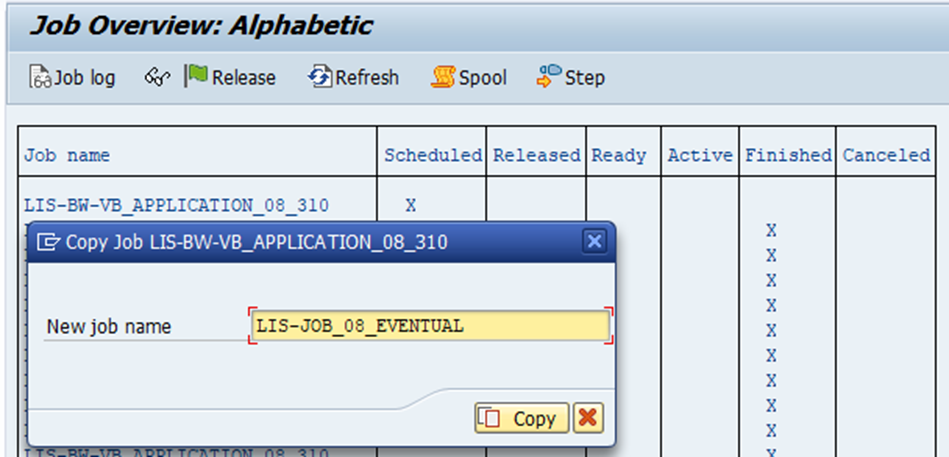
Access SM37 tcode and search for the Job you create. Remember mark all Job Status Flag:

Select the Job, click on “Release”, choose “Immediate” and then “Save” (Ctrl+S):

The Job will be executed, wait to finish by checking the status of the job (SM37).
After proceeding either Option 1 or Option 2, let`s check the MCEX Queue, tcode LBWQ.
Access LBWQ tcode and note that the entries corresponding MCEX08 are missing. It`s happen because the system moves the data to RSA7 Delta Queue.
Access RSA7 tcode and note that there are entries in the delta queue:

BW – Load delta from RSA7 to BW:
The next step is loading the data from ECC RSA7 Delta queue to BW. To do this, run 2 times the InfoPackage of DataSource that you are enhancing. In the case covered in this book, 2LIS_08TRFKZ.
⚠Pay Attention: You must do run the Delta InfoPackage 2 times. Only this way, you ensure that the Delta queue will be really clean.
In BW environment, run the Delta InfoPackage about your extractor DataSource.
At first run, Records will be load from ECC.
At second run, none Records will be load from ECC. It is this step, that the RSA7 Delta queue will be reset.
In ECC environment, return to RSA7 tcode and refresh. Note the entries is 0:

Now, the system is capable to transport the Request do ECC PRD environment. ⚠ Do it as soon as possible.
⚠ Pay Attention – Important note starting from this point:
⚠ From this point on, all steps need to be performed quickly. Stay aware of this and stay together BASIS consultant in order to avoid any surprises.
ECC – Transporting Request to ECC PRD environment:
After proceeding all steps described above, you can transport the request to ECC PRD environment as soon as possible.
Agility is the keyword at this moment, because will be exists a window of time in which the MCEX queue will be filled, and we will have to delete, so, few data will be lost, but take easy, we will do some process to recovery this data.
It will be part of future processes to recovery this data, but the sooner it happens, the better is.
After proceeding all steps described above, you can transport the request to ECC PRD environment as soon as possible.
If the Request occurs error, check the main Check Points:
- Setup table is empty
- RSA7 Delta queue is empty
⭐ Next Chapters:
🔓⭐ To get access to the next chapters, purchase our 📚e-book on Amazon ↗
⠀
ECC – After the Request has been transported to ECC PRD – Step 1
ECC – After the Request has been transported to ECC PRD – Step 2
BW – Transporting Request to ECC PRD environment
Return to ECC – After the Request has been transported to BW PRD
ECC – Recovery Lost Delta Data
⠀⠀Introduction to Recovery Lost Delta Data
⠀⠀MCEX02 – Purchasing
⠀⠀MCEX04 – Shop Floor Control (PP)
⠀⠀MCEX05 – Quality Management
⠀⠀MCEX06 – Invoice Verification
⠀⠀MCEX08 – Shipment
⠀⠀MCEX11 – SD Sales
⠀⠀MCEX12 – LE Shipping
⠀⠀MCEX13 – SD Billing
⠀⠀MCEX17 – Plant Maintenance
Bonus
✅ Summary
In the e-book presented above you will learn how to mastering the 2LIS Data Source (Delta Extractors).
After read it, the entire process of Setup 2LIS datasource in BW system will be simple for you. The secret within the e-book never been revealed even by SAP
The teachings will make you a sought-after professional.
I ensure that you will become a Delta DataSource specialist! 👑🚀
Keywords: SAP bw delta datasource; How does a datasource communicates “DELTA” with BW?; BW; Delta; Data Source; BW Extractor; LBWE; LBWQ; MCEX; 2LIS; 2LIS_02; 2LIS_04; 2LIS_05; 2LIS_08; 2LIS_11; 2LIS_12; 2LIS_13; 2LIS_17; MC02M_0ACC; MC02M_0CGR; MC02M_0HDR; MC02M_0ITM; MC02M_0SCL; MC02M_0SCN; MC02M_0SGR; MC04PE0ARB; MC04PE0COM; MC04PE0MAT; MC04PK0KAN; MC04P_0ARB; MC04P_0COM; MC04P_0MAT; MC05Q00ACT; MC05Q00CSE; MC05Q00ITM; MC05Q00NTF; MC05Q00TSK; MC05Q1_0INSP; MC05Q2_0INSP; MC05QV0UDN; MC08TR0FKP; MC08TR0FKZ; MC08TR0TK; MC08TR0TLP; MC08TR0TS; MC11VA0HDR; MC11VA0ITM; MC11VA0KON; MC11VA0SCL; MC11VA0STH; MC11VA0STI; MC11V_0ITM; MC11V_0SCL; MC11V_0SSL; MC12VC0HDR; MC12VC0ITM; MC12VC0SCL; MC13VD0HDR; MC13VD0ITM; MC13VD0KON; MC17I00ACT; MC17I00CSE; MC17I00ITM; MC17I00NTF; MC17I00TSK; MC17I30HDR; MC17I30OPR; lbwq tcode in sap; lbwe tcode in sap bw; 2lis extractors; lbwg tcode in sap; What is SAP LBWQ?
Did you like the content? Want to get more tips? Subscribe ↗ for free!
Follow on social media:
- How to Find Deleted VTTK Transport in SAP ECC
 Bem Vindo! | Welcome! By Felipe Lamounier, Minas Gerais, Brasil🇧🇷 – powered by 🙂My Easy B.I. 📑 Table of Contents: Introduction In this post, we will learn how to identify which transports were deleted in SAP ECC. We will also see how this data is removed from the VTTK table over a specific period. InContinuar lendo “How to Find Deleted VTTK Transport in SAP ECC”
 - How to identify SAP BW Process Chains with Recurring Errors
 This post by Felipe Lamounier focuses on identifying recurring errors in Process Chains (RSPC) within SAP BW over a 65-day period. It provides a structured approach to filter and analyze execution logs, aimed at improving resource management and system efficiency by addressing improperly executed chains. The analysis concludes with recommendations for maintaining or removing chains based on error frequency.
 - How to Retrieve SAP Table Metadata Efficiently
 This post by Felipe Lamounier provides a guide on efficiently retrieving metadata from SAP table fields using transaction SE16 and the DD03M view. Key elements include data element, data type, field length, and descriptions. Additionally, the post lists important SAP system tables, enhancing understanding of SAP metadata extraction.
 🙂My Easy B.I.