🇧🇷 Ver este post na versão em Português ↗
Welcome!
By Felipe Lamounier, state of Minas Gerais, Brazil – powered by 🙂My Easy B.I.
In this article we will learn how to use the “Decision Between Multiple Alternatives” option in Process Chain in SAP BW (or ECC) according to the Chain run Time or based on the Chain run Day.
🔭 See also Related Posts:
📑 Table of Contents:
- 🏁 Introduction
- “Decision” based on the ‘Day’ of execution
- “Decision” based on the ‘Time’ of execution
- “Decision” based on the ‘Day of the Week’ of execution
- “Decision” based on the ‘Last Day of the Month’ of execution
- ✅ Conclusion
🏁 Introduction
“Decision Between Multiple Alternatives” is an available process type that can be used in building Process Chains (RSPC) in SAP, generally used in BW, but also available in ECC.
This process is used to add intelligence to the execution of Process Chains, as it allows the insertion of alternatives and conditions in the system, so that the chain can follow different paths as configured by the user.
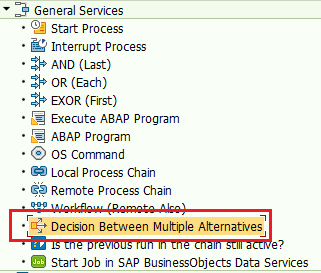
This option is available in the RSPC transaction, in “General Services” –> “Decision Between Multiple Alternatives” as shown in the image below:
The configuration of this “Decision Between Multiple Alternatives” process is done by establishing conditions in the SAP formula builder. This condition will return a boolean value, i.e. true or false. From there, the result of the conditions ‘If’, ‘Else’, ‘Else If’ and so on is configured.
See the example below, a process chain that must run only until the 8th of each month and after that the processes must not run.
We know that there is no way to put this intelligence in the default SAP Job Scheduler, so we programmed it to run the example chain daily, however, with the option “Decision Between Multiple Alternatives” dealing with this need for verification of the day.
So, in the example below the string is scheduled daily, it starts, and the first step is the “Decision” box, where it will be checked if the current date is <= 08.
If true, the chain will take “path 1”, which will execute the steps in the process chain.
If it is false, the chain will take “path 2”, which simply does nothing, and in this way, even if indirectly, the objective of not executing the chain is achieved.

See the process configuration screen. The conditions are defined through the Formula constructor and which Option (Path) will be followed if the established condition is True

Below is the chain formula used in this example:

Note that in the example there are only 2 conditions / options / path (as you prefer to call it). However, you can add more conditions, as shown in the example below:
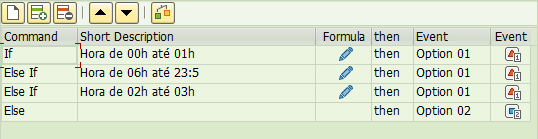
The formula offers you Fields and Functions to build the argument as needed. Below is an image with the fields and some examples of functions. Note that functions are filtered by Date Functions, but there are other categories:

Next, we will see in practice some examples of process chains that use “Decision Between Multiple Alternatives”.
Want to learn more? Access our area 🎓🚀Training&Education↗
“Decision” based on the ‘Day’ of execution
In the example below, it is necessary that the chain run only until the 8th of each month.
We use the function “SUBSTRING” and the field “SYST-DATUM” (Date).
With the “SUBSTRING” function, we extract the last 2 characters from the “SYST-DATUM” field and thus obtain only the day.
We check if the result is <= ’08’ and this will return a boolean value True or False
SUBSTRING( SYST-DATUM, 6, 2 ) <= '08'If condition is True, follow “path 1”, if False, “path 2”

“Decision” based on the ‘Time’ of execution
In the example below, the chain must NOT run between 00:00 AM and 03:00 AM.
We use the “SYST-TIMLO” field (local time) and the “AND” function to compare whether the execution time is between the configured period.
SYST-TIMLO >= '00:00:01' AND SYST-TIMLO <= '03:00:00'
In this example we will handle the time exception, if the condition is True, it will not run, if the condition is False, that is, it is a different period, it will execute.
“Decision” based on the ‘Day of the Week’ of execution
In the example below, the workflow should only execute on Tuesdays, Thursdays, and Sundays.
We use the formula “DATE_WEEKDAY1” (Calculate the weekday number of the date) and the field “SYST-DATUM” (current date).
“DATE_WEEKDAY1” returns the corresponding number of the week, where:
Monday = 1; Tuesday = 2; Wednesday = 3; Thursday = 4; Friday = 5; Saturday = 6; Sunday = 7.
DATE_WEEKDAY1( SYST-DATUM ) = 2 OR DATE_WEEKDAY1( SYST-DATUM ) = 4 OR DATE_WEEKDAY1( SYST-DATUM ) = 7
In the formula above, it will be checked if the day is Tuesday or Thursday or Sunday, and if it is true, the condition we want will be met.
“Decision” based on the ‘Last Day of the Month’ of execution
In the example below, the chain of processes must execute only on the last day of the month.
We use the formula “SUBSTRING” to find the current month’s number through the date “SY-DATUM” and add +1 day to the current date.
If the month of the next day is different, it means that the current date is the last day of the month.
SUBSTRING( SYST-DATUM, 4, 2 ) <> SUBSTRING( ADD_TO_DATE( SYST-DATUM, 1 ), 4, 2 )
✅ Conclusion
In this article we saw how to include more intelligence in the execution of Process Chains (RSPC) in SAP using the option “Decision Between Multiple Alternatives”.
With this option we can configure the chain to follow different paths in its execution according to the parameters defined by the user. These parameters can be diverse based on system fields and available functions.
Using the “Decision Between Multiple Alternatives” will give you more room for maneuver than the system’s standard Jobs schedule allows you, so you’ll be able to achieve a greater level of customization in your Schedule.
If you have any doubts, write them in the comments below.
Thanks!
Keywords: SAP BW RSPC; Understand Decision Between Multiple Alternatives in RSPC Process Chain; How to use Decision Between Multiple Alternatives; Decide between several alternatives; How to use Decision Between Multiple Alternatives in RSPC Process Chain; How to Implement Decision Making Among Multiple Alternatives in SAP BW; Optimization of Process Chains in SAP BW: Using Decision Making Among Multiple Alternatives; How to Configure Decisions in Process Chains in SAP BW; Using Decision Making Among Multiple Alternatives in SAP RSPC; Best Practices for SAP BW Process Management with Alternative Decisions; SAP BW: Complete Guide to Decision Making Among Multiple Alternatives in Process Chains; Examples of Using Decision Making Among Multiple Alternatives in Process Chains
Did you like the content? Want to get more tips? Subscribe ↗ for free!

Follow on social media:
 🙂My Easy B.I.
Um comentário em “🔀[SAP BW] “Decision Between Multiple Alternatives” in the Process Chain (RSPC): Learn how to use it”