🇧🇷 Ver este post na versão em Português ↗
Welcome!
By Felipe Lamounier, state of Minas Gerais, Brazil – powered by 🙂My Easy B.I.
In this post, I will address a very important activity, which is often overlooked by BW consultants, that is the ongoing maintenance of the environment in order to achieve sustainable server growth. I will demonstrate how I managed to free up over 1 TB of data from SAP BW (HANA) memory using the techniques discussed below.
The main transaction used was SE14 (Application Analysis), a very interesting transaction that will guide you through this process.
📑 Table of Contents:
- Introduction
- ST14 – Application Analysis
- Top Largest PSA
- Top Largest Change Logs – ODS (3.x)
- Top Largest Change Log – ADSO (7.x)
- How to check if a process is already in a process chain?
- Other Transactions
- Conclusion
Introduction
It is very important for the sustainable growth of the SAP BW environment to perform cleaning tasks (Clean Up) and automate these tasks in recurring routines (Housekeeping).
Did you know that PSA load requests and ODS/ADSO Change Log are stored in BW, consuming RAM memory?
These requests are not automatically deleted by the system unless configured routines are in place, which we will discuss in this post.
This work brings benefits such as environment stability, as we free up system resources, and it also becomes easier to evaluate how much storage space is actually needed, allowing for better capacity planning and avoiding unnecessary costs.
ST14 – Application Analysis
Overview ST14
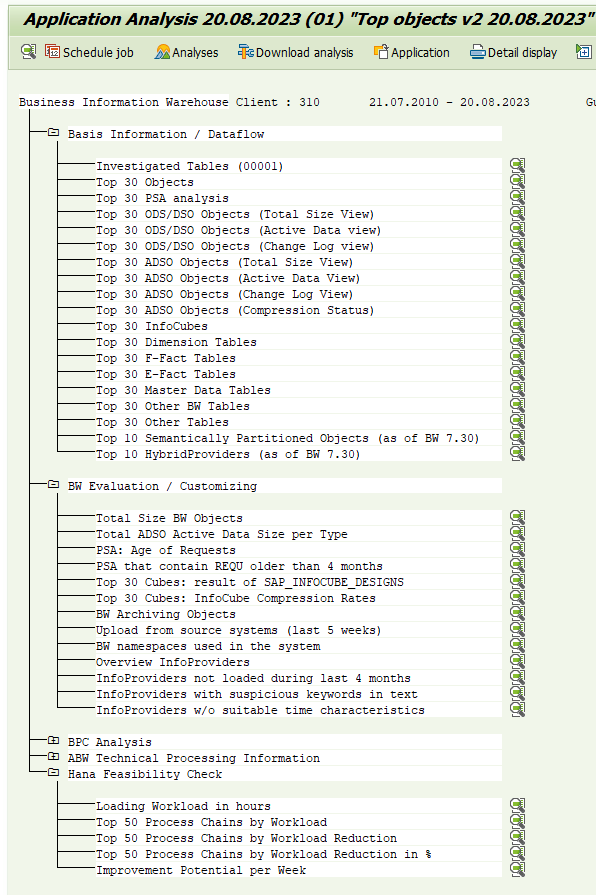
The ST14 transaction identifies and lists the largest objects in the SAP BW environment. These lists will serve as a guide to identify which objects need to be addressed, cleaned, and included in automated housekeeping routines. This transaction will display the following lists:
Basis Information / Dataflow:
- Investigated Tables
- Top 30 Objects
- Top 30 PSA analysis
- Top 30 ODS/DSO Objects (Total Size View)
- Top 30 ODS/DSO Objects (Active Data view)
- Top 30 ODS/DSO Objects (Change Log view)
- Top 30 ADSO Objects (Total Size View)
- Top 30 ADSO Objects (Active Data View)
- Top 30 ADSO Objects (Change Log View)
- Top 30 ADSO Objects (Compression Status)
- Top 30 InfoCubes
- Top 30 Dimension Tables
- Top 30 F-Fact Tables
- Top 30 E-Fact Tables
- Top 30 Master Data Tables
- Top 30 Other BW Tables
- Top 30 Other Tables
- Top 10 Semantically Partitioned Objects (as of BW 7.30)
- Top 10 HybridProviders (as of BW 7.30)
Hana Feasibility Check:
- Loading Workload in hours
- Top 50 Process Chains by Workload
- Top 50 Process Chains by Workload Reduction
- Top 50 Process Chains by Workload Reduction in %
- Improvement Potential per Week
BW Evaluation / Customizing:
- Total Size BW Objects
- Total ADSO Active Data Size per Type
- PSA: Age of Requests
- PSA that contain REQU older than 4 months
- Top 30 Cubes: result of SAP_INFOCUBE_DESIGNS
- Top 30 Cubes: InfoCube Compression Rates
- BW Archiving Objects
- Upload from source systems (last 5 weeks)
- BW namespaces used in the system
- Overview InfoProviders
- InfoProviders not loaded during last 4 months
- InfoProviders with suspicious keywords in text
- InfoProviders w/o suitable time characteristics


How to run the ST14 transaction
In SAP BW, access the transaction “ST14” (Application Analysis) and select the option “Business Warehouse”.
Click on “Schedule job”.

Select the options as shown below and schedule the Job to run. It will take a few minutes. Check the execution in transaction SM37 and once it is completed, go back to transaction ST14.

Top Largest PSA
On ST14, click on “Top 30 PSA analysis” to view the list.


You will be shown the list of the Top 30 Largest PSA. From there, we will create an automated routine to selectively remove old requests in the chain of processes.
There are 2 ways you can do this, you can either include the process directly in the Process Chain that executes the data load or create a dedicated Process Chain that groups all the PSA request deletions.
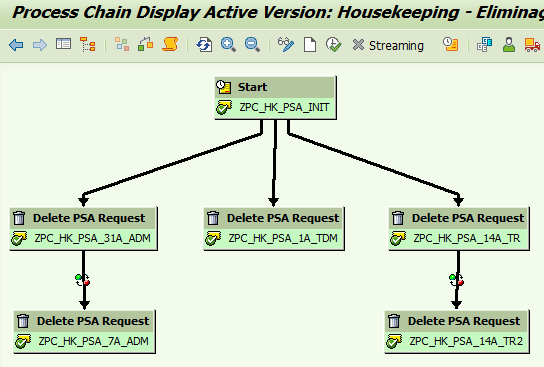
In the example in this post, we chose to create a Process Chain that groups all the deletions and will be executed daily.
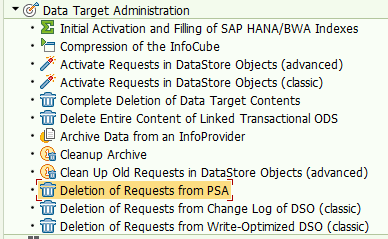
Access transaction RSPC (Process Chains), click on modify, go to “Data Target Administration” -> “Deletion of Requests from PSA”:
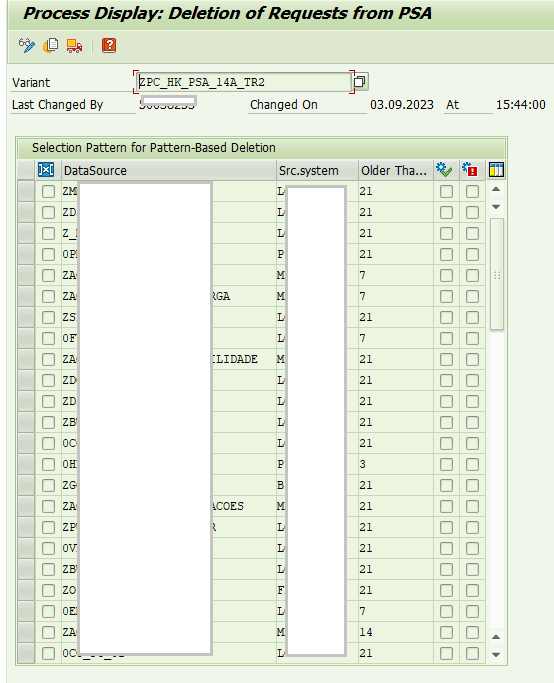
Configure the “Deletion of Requests from PSA” process by adding the DataSource and Source System as indicated in the “LOGICAL_NAME” field in the Top PSA list.
Also, configure how many days the requests will be retained.
In the example below, a Process Chain was created containing several PSA elimination options, with some intervals to maintain the requirements of 1 day, 7 days, 21 days, and 31 days as needed. This chain was scheduled to run daily.
Pay Attention: Changelog for ODS (3.x) and Changelog for aDSO (7.x) have different configuration objects. Both will be displayed below:
Top Largest Change Logs – ODS (3.x)
On ST14, click on “Top 30 ODS/DSO Objects (Change Log view)” to view the list.


Access the RSPC transaction (Process Chains), click on modify, go to “Data Target Administration” –> “Deletion of Requests from Change Log of DSO (classic)”:

Enter the DSO (3.x) in the “DSO Name” field, set the days to keep, and select the 3 deletion options as highlighted below:

It is also possible to delete manually. In transaction “RSA1,” go to “Manage”. Then “Environment,” “Delete Change Log Data.”

Top Largest Change Log – ADSO (7.x)
On ST14, click on “Top 30 ADSO Objects (Change Log View)” to view the list.

Access the RSPC transaction (Chain Processes), click on Modify, go to “Data Target Administration” -> “Clean Up Old Requests in DataStore Objects (advanced)”:
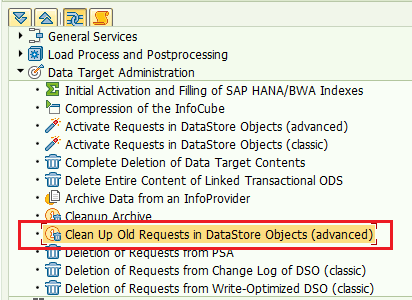
Enter the ADSO as per the “LOGICAL_NAME” field, select “Remove Old Requests From Change Log”, and configure the number of days to keep.

How to check if a process is already in a process chain?
Access the table “RSPCVARIANT” by passing the parameters:
TYPE = ADSOREM ; CHGLOGDEL ; PSADELETE
OBJVERS = A
LOW = *<extrator, ods, adso>*


Now we will search in which process chains this variant “ZPC_HK_PSA_7A_ADM” is inserted.
Access the table “RSPCCHAIN” and pass the parameters:
OBJVERS = A
VARIANT = <RSPCVARIANT-VARIANT> (According to the list returned in the previous select “ZPC_HK_PSA_7A_ADM”)

The CHAIN_ID field corresponds to the process chain.
Other Transactions
ST03n : Workload and Performance Statistics
ST10 : Table Call Statistics
Conclusion
The post discusses the importance of continuous maintenance of the SAP BW (Business Warehouse) environment, which is often overlooked by developers. The author highlights how they managed to release over 1 TB of data from the SAP BW HANA memory using the SE14 transaction (Application Analysis) and cleaning and automation techniques. This maintenance is crucial to ensure sustainable server growth, as PSA loads and ODS/ADSO Change Log requirements can consume RAM if not properly addressed. The ST14 transaction is used to identify the largest objects in the environment, providing lists that guide cleaning actions and inclusion in housekeeping routines. Continuous maintenance brings advantages such as stability, better capacity planning, and unnecessary cost reduction.
Furthermore, the text mentions various categories of objects and information that can be evaluated and optimized, such as investigated tables, PSA objects, ODS/DSO objects, ADSO objects, dimension and fact tables, among others. It also emphasizes the importance of checking HANA feasibility, highlighting workload indicators and improvement potential. Finally, it mentions the overall evaluation of BW objects, the size of active ADSO objects, the age of PSA requests, and other aspects that contribute to effective maintenance of the SAP BW environment.
In summary, we have seen the importance of continuous maintenance of the SAP BW environment to ensure sustainable server growth, highlighting the tools and techniques used to identify, clean, and automate object and information management, providing stability and operational efficiency.
Feel free to leave any questions, suggestions, or comments in the comments section below.
Keywords: SAP BW; House Keeping BW; Clean Up BW;
Did you like the content? Want to get more tips? Subscribe ↗ for free!
Follow on social media:


 🙂My Easy B.I.
2 comentários em “🧹SAP BW | Clean Up + Housekeeping: How to clean the environment and grow sustainably”