🇧🇷 Ver este post na versão em Português ↗
Welcome!
By Felipe Lamounier, state of Minas Gerais, Brazil – powered by 🙂My Easy B.I.
In this post, I will explain how to find which BEx Query caused a Memory Dump in SAP BW.
This manual applies to the following Memory Dumps codes:
- TSV_LIN_ALLOC_FAILED : No memory available to extend the index of an internal table
- TSV_TNEW_OCCURS_NO_ROLL_MEMORY : No memory of length available for OCCURS area.
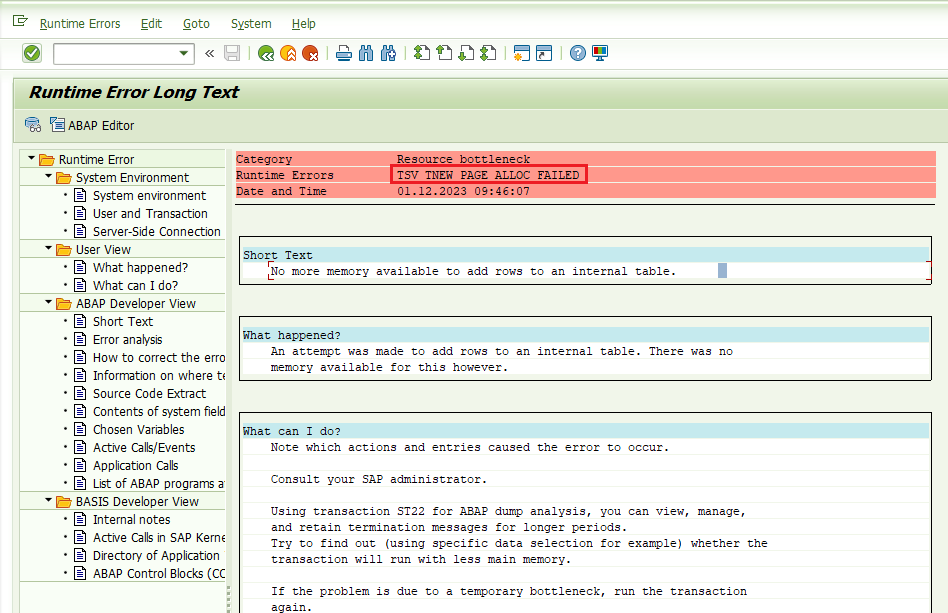
- TSV_TNEW_PAGE_ALLOC_FAILED : No more memory available to add rows to an internal table.
In transaction ST22 (ABAP Dump Analysis), select the dump to be analyzed, as shown in the example below:

Click “Find” (Ctrl+F) and search for “n_cube_nam”:

Navigate to the found line and you will be directed to the part of the log that shows the BEx Query related to Memory Dump, as shown in the image below:

Sugestões leitura para Performance:
🏇 [SAP BW] Memory and Performance Analysis for MDX (SAP Note 1381821) ↗
🧹SAP BW | Clean Up + Housekeeping: How to clean the environment and grow sustainably ↗
Feel free to leave any questions, suggestions, or comments in the comments section below, at the end of the page.
Keywords: SAP BW; TSV_TNEW_OCCURS_NO_ROLL_MEMORY; TSV_LIN_ALLOC_FAILED; TSV_TNEW_PAGE_ALLOC_FAILED; No more memory available to add rows to an internal table; Dump BW memory error
Did you like the content? Want to get more tips? Subscribe ↗ for free!
Want to learn more? Access our area 🎓🚀Training&Education↗
Follow on social media:
 🙂My Easy B.I.
Um comentário em “SAP BW: How to find out which Query caused Memory Dump (TSV_TNEW_PAGE_ALLOC_FAILED)”