
Welcome!
By Felipe Lamounier, state of Minas Gerais, Brazil – powered by 🙂My Easy B.I.
In this post, we will learn how to identify the Load Request from a Job (SM37). We will cover both InfoPackages and DTP Jobs.
📑 Table of Contents:
Introduction
The post will provides a detailed guide on identifying a BW Load Request from an SM37 job in SAP BW, focusing on both InfoPackages and DTP Jobs. It outlines steps to access and interpret job information within the SM37 transaction and then guides users on how to retrieve and utilize the Load Request details using the RSRQ transaction.
Job Source Identification: Procedures to Locate the Load Request
Job Prefix BIDTPR_*
In BW, access transaction SM37 (Overview of Job Selection).
Select the Job line and click on the “Step” button:

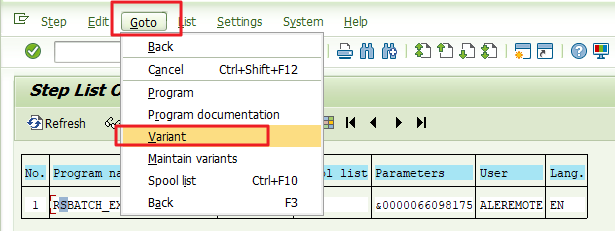
Upon clicking on “Step”, this screen will be displayed. Select the line again and click on the menu “Goto” –> “Variant”:
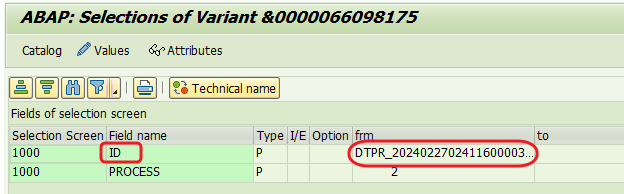
The variants of the Load Request Job will be displayed. Copy the value from the “ID” field, as shown in the image below:
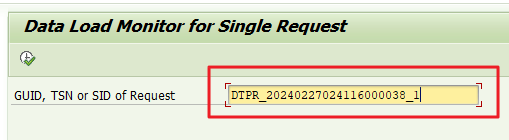
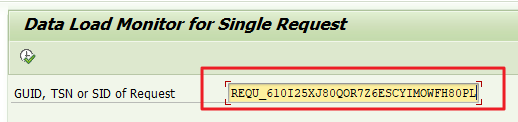
Access transaction RSRQ (Data Load Monitor for Single Request).
Insert the ID copied in the previous step and Execute:
Job Prefix BIREQU_*
In BW, access transaction SM37 (Overview of Job Selection).
Select the Job line and click on the “Step” button:

Upon clicking on “Step”, this screen will be displayed. Select the line again and click on the menu “Goto” –> “Variant”:
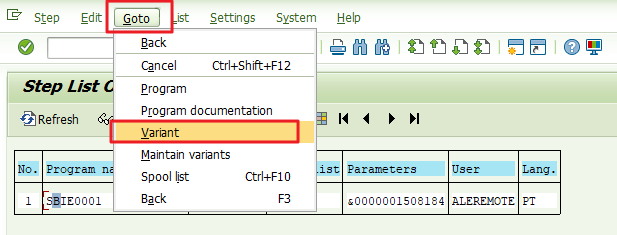
The variants of the Load Request Job will be displayed. Copy the value from the “REQUEST” field, as shown in the image below:

Access transaction RSRQ (Data Load Monitor for Single Request).
Insert the REQUEST copied in the previous step and Execute:
Conclusion
In this tutorial, we explored how to find a load request linked to a job in SAP BW using SM37 and RSRQ, covering key steps for both InfoPackages and DTP Jobs. The guide simplifies these procedures, enabling users to quickly pinpoint and manage load requests, which is vital for maintaining data accuracy and system efficiency in SAP BW
Feel free to leave any questions, suggestions, or comments in the comments section below, at the end of the page.
Keywords: RSRQ; SM37 BW load request identification; Managing SAP BW jobs; Identifying a Load Request in SAP BW Using Job SM37; Guide to Locating a Load Request Through SM37 Job in SAP BW; How to find a Load Request from a Job (SM37); Uncovering Load Requests in SAP BW: A SM37 Job Tutorial
Did you like the content? Want to get more tips? Subscribe ↗ for free!
🔭See Also:
Want to learn more? Access our area 🎓🚀Training&Education↗
Follow on social media:
- How to Find Deleted VTTK Transport in SAP ECC
 Bem Vindo! | Welcome! By Felipe Lamounier, Minas Gerais, Brasil🇧🇷 – powered by 🙂My Easy B.I. 📑 Table of Contents: Introduction In this post, we will learn how to identify which transports were deleted in SAP ECC. We will also see how this data is removed from the VTTK table over a specific period. InContinuar lendo “How to Find Deleted VTTK Transport in SAP ECC”
 - How to identify SAP BW Process Chains with Recurring Errors
 This post by Felipe Lamounier focuses on identifying recurring errors in Process Chains (RSPC) within SAP BW over a 65-day period. It provides a structured approach to filter and analyze execution logs, aimed at improving resource management and system efficiency by addressing improperly executed chains. The analysis concludes with recommendations for maintaining or removing chains based on error frequency.
 - How to Retrieve SAP Table Metadata Efficiently
 This post by Felipe Lamounier provides a guide on efficiently retrieving metadata from SAP table fields using transaction SE16 and the DD03M view. Key elements include data element, data type, field length, and descriptions. Additionally, the post lists important SAP system tables, enhancing understanding of SAP metadata extraction.
 🙂My Easy B.I.