Welcome!
By Felipe Lamounier, state of Minas Gerais, Brazil – powered by 🙂My Easy B.I.
This post aims to address a problem in which the ODQ_CLEANUP Job does not complete in the ECC PRD and remains running indefinitely in the environment and does not clean the queue, accumulating load requests in the environment.
📑 Table of Contents:
Introduction
The ODQ_CLEANUP job deletes load requests that remain in the ODQ queue of BW ODP extractors in the source environment, in our case the ECC PRD.
The ODQ queue holds requests for a while, but they should be removed from the system after they are completed for a period of time.
Occasionally, some load requests remain in “limbo”. Even though they have already been completed or canceled, the status remains stuck on “Extraction Running“.
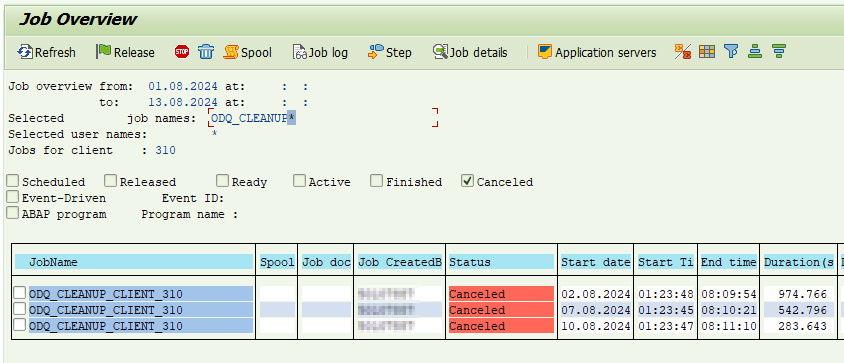
See the example below, the Job ODQ_CLEANUP_CLIENT_310 runs indefinitely until manually terminated.
Problem identification
In the SAP ECC, go to transaction “ODQMON” (Monitor for Operational Delta Queue). Click on “Requests“:

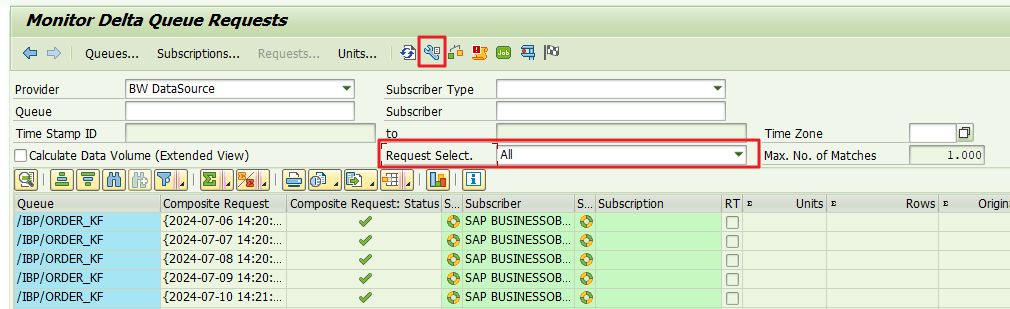
On the “Monitor Delta Queue Requests” screen, click on the “Technical Names On/Off” menu button. In the “Request Select.” option, select “All” as shown in the image below:
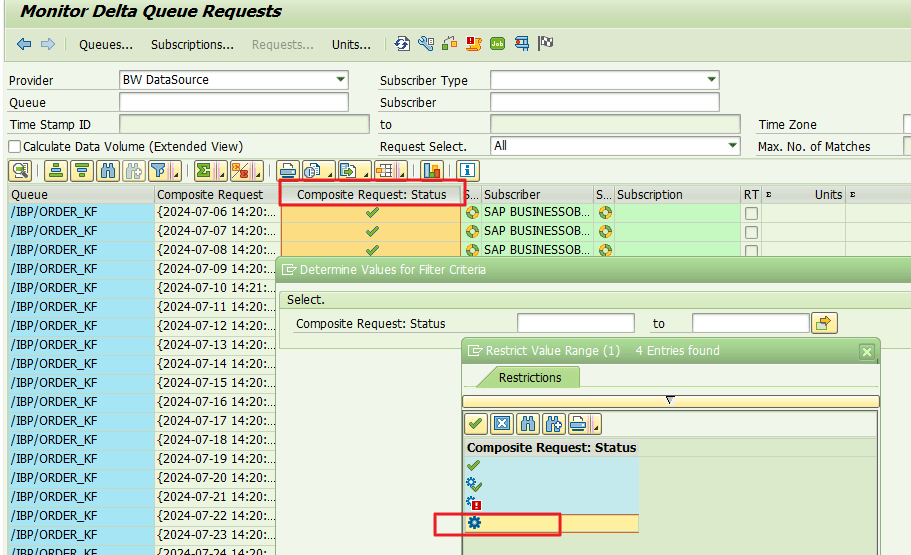
The next step is to identify the old load requests that remained stuck in the “Extraction Running” status.
In the “Composite Request: Status” column, filter the “Extraction Running” status as shown in the image below:

Sort the “Composite Request” column. Select and click on the “Sort in Ascending Order” button.
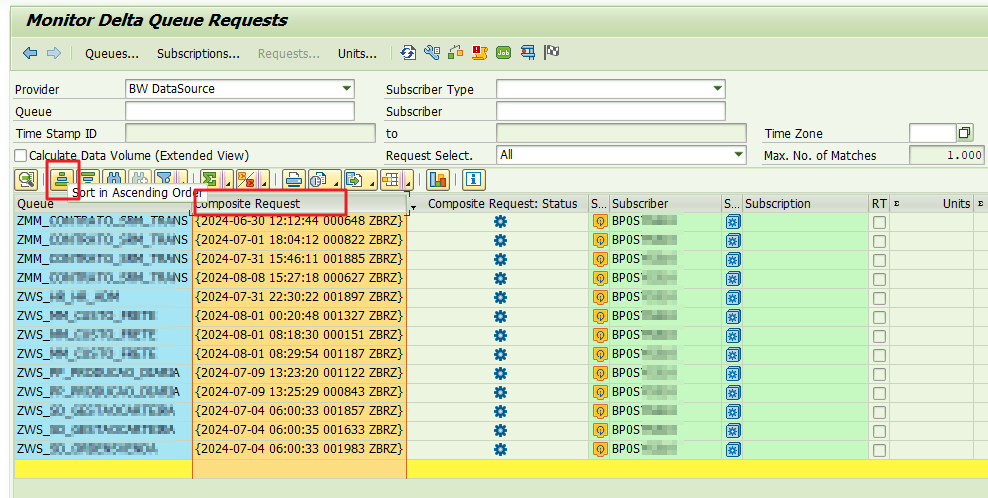
The first load request in the list is likely to be a problematic request. However, we will attempt a standard fix using the “ODQMON” transaction itself.
Solution – Option 1
Continuing with the transaction “ODQMON“, select the first load request and click on the “Check and Correct Current Requests” button as shown in the image below:

When you click on “Check and Correct Current Requests,” the system will attempt to automatically adjust the request status to completed or canceled.
If there is any problematic load request, a Dump will be generated in the system. Note the Dump request as shown in the image below.:

Go back to the previous steps, in “Monitor Delta Queue Requests” and with the final list of requests, click again on “Technical Names On/Off“. to view the load request ID generated in BW as shown in the image below, “Composite Request” column.
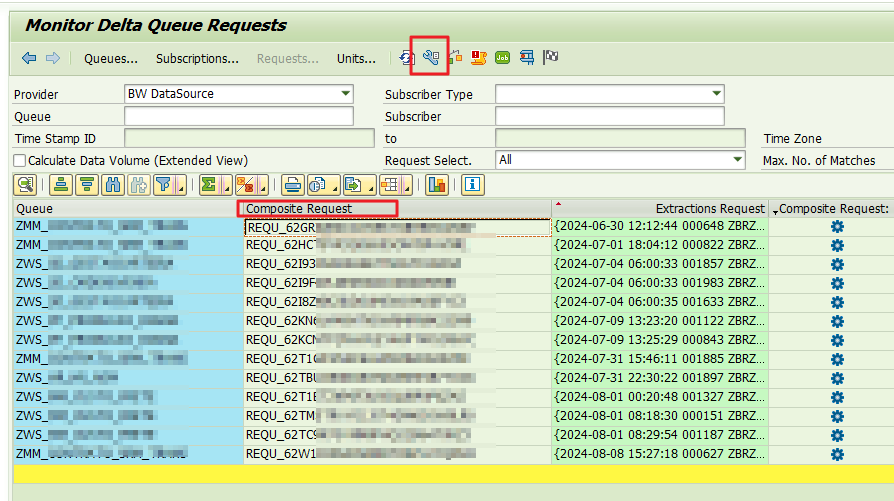
The next step is to force the Error (red) status in BW for each load request identified in the previous step. This is an attempt to adjust the status. After this process we will return to ECC and run the automatic system verification and correction again.
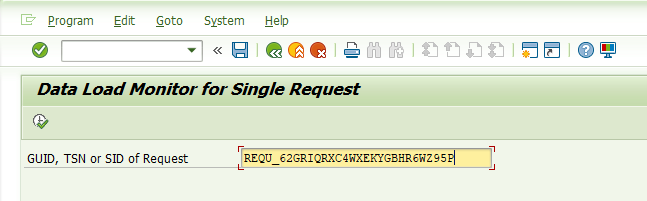
Enter SAP BW and access the transaction “RSRQ” (Data Load Monitor for Single Request) and enter each load request, according to the image below:
Click on the “Status” tab and then on Total (traffic light). Select “Status NOT OK“
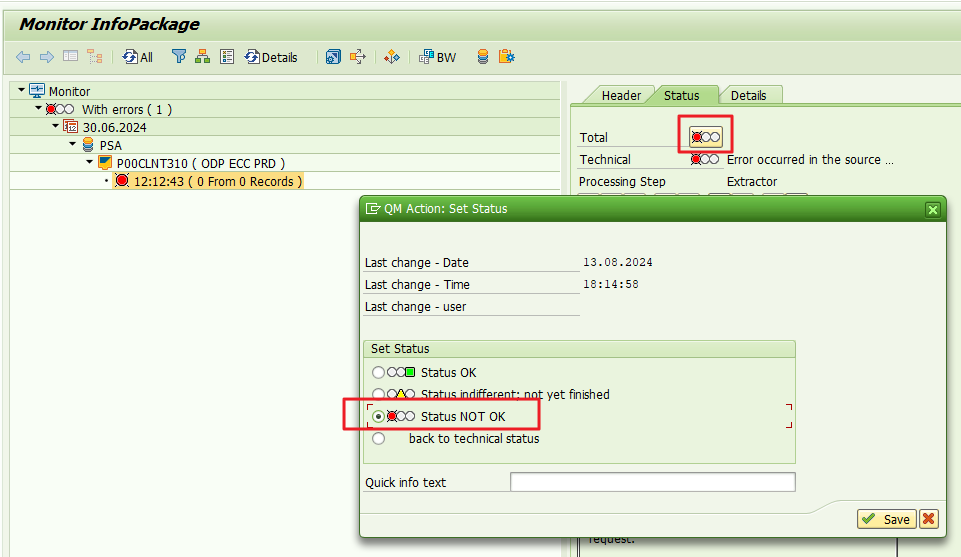
Repeat the process for all other requests that should have been closed.
After setting all requests as Error (red), go back to the ECC and repeat the steps as shown in the topics “Problem identification” and “Solution – Option 1“.
Repeat the option “Check and Correct Current Requests”
If the error persists, the alternative is to open an incident with SAP so that they can change the request status to Closed, as per the template below.
Solution – Option 2
An alternative is to change the record status directly in the table “ODQREQ” (Operational Delta Queue: General Request), field “STATUS_ICON” field (Status)

Change the Status to “Extraction Failed”

SAP Incident
As mentioned, if after following all the steps described in the items above the issue persists, the solution is to open a ticket in SAP, according to the template below.
Template
Product: SAP ERP
Product function: SAP ERP > Enterprise Technology > Business Warehouse > Integration > Operational Data Provisioning
Component: BC-BW-ODP
Path Taken: ODP Source System to SAP NetWeaver Systems Other
Title: ODQ Request stuck in status “Extraction Running”
Description:
We are facing a problem with the ODQ_CLEANUP job in the ECC PRD environment, as it does not complete its process.
The job has been running for more than XXXX seconds.
Upon investigation, we found some load requests stuck in the ‘Extraction Running’ status since <date>.
I attempted to use the ‘Check and Correct Current Requests’ button in the ODQMON transaction and also force the status in BW to be Error, but it was unsuccessful, resulting in a program timeout.
What do you suggest? Is there any SAP note to address this issue or any other recommended procedure?
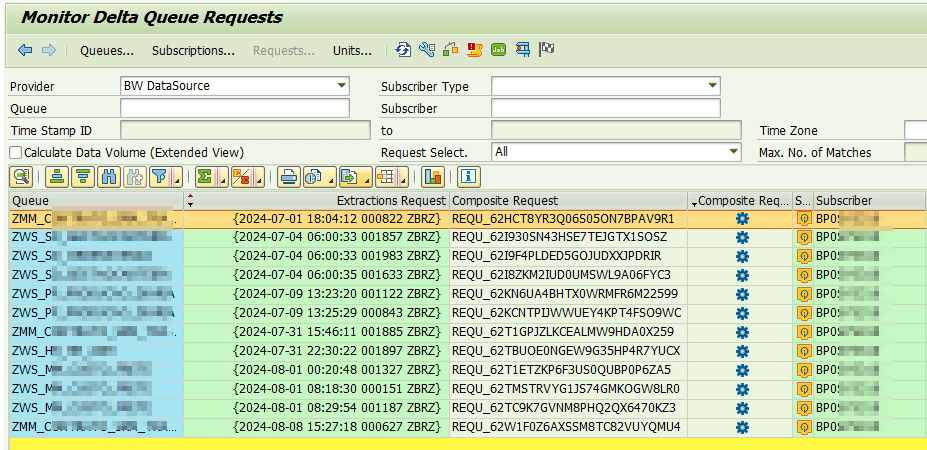
Load Request:
REQU_62HCT8YR3Q06S05ON7BPAV9R1
REQU_62I930SN43HSE7TEJGTX1SOSZ
REQU_62I9F4PLDED5GOJUDXXJPDRIR
REQU_62I8ZKM2IUD0UMSWL9A06FYC3
REQU_62KN6UA4BHTX0WRMFR6M22599
REQU_62KCNTPIJWWUEY4KPT4FSO9WC
REQU_62T1GPJZLKCEALMW9HDA0X259
REQU_62TBUOE0NGEW9G35HP4R7YUCX
REQU_62T1ETZKP6F3US0QUBP0P6ZA5
REQU_62TMSTRVYG1JS74GMKOGW8LR0
REQU_62TC9K7GVNM8PHQ2QX6470KZ3
REQU_62W1F0Z6AXSSM8TC82VUYQMU4
Feel free to leave any questions, suggestions, or comments in the comments section below, at the end of the page.
Keywords: ODQ_CLEANUP; ODQ_CLEANUP Lamounier; ODQ CLEANUP; ODQ_CLEANUP_CLIENT_310; Resolving the ODQ_CLEANUP Job Stuck in SAP ECC PRD: A Comprehensive Guide; How to Fix the ODQ_CLEANUP Job Running Indefinitely in ECC PRD; Troubleshooting ODQ_CLEANUP Job Failures in SAP ECC PRD; Dealing with Persistent ODQ_CLEANUP Job Issues in ECC PRD; What to Do When ODQ_CLEANUP Job Won’t Finish in SAP ECC PRD; Fixing the Stuck ODQ_CLEANUP Job in SAP ECC PRD: Step-by-Step; ODQ_CLEANUP Job Not Completing in ECC PRD? Here’s How to Fix It; SAP ECC PRD ODQ_CLEANUP Job Running Forever? Try This Solution; A Guide to Solving ODQ_CLEANUP Job Issues in SAP ECC PRD; How to Resolve the ODQ_CLEANUP Job Not Completing Issue in SAP ECC; how to fix ODQ_CLEANUP job stuck in SAP ECC PRD; troubleshooting ODQ_CLEANUP job failure in SAP; SAP ECC PRD ODQ_CLEANUP job running indefinitely; SAP ECC ODQ_CLEANUP job hang-up resolution guide; ODQ_CLEANUP job not completing SAP ECC; How to fix stuck ODQ load requests; Resolve ODQ_CLEANUP job errors in SAP ERP; ODQ / ODQMON extraction running status error.; job oqd clean up not finish
Did you like the content? Want to get more tips? Subscribe ↗ for free!
🔭See Also:
Want to learn more? Access our area 🎓🚀Training&Education↗
Follow on social media:
- How to Find Deleted VTTK Transport in SAP ECC
 Bem Vindo! | Welcome! By Felipe Lamounier, Minas Gerais, Brasil🇧🇷 – powered by 🙂My Easy B.I. 📑 Table of Contents: Introduction In this post, we will learn how to identify which transports were deleted in SAP ECC. We will also see how this data is removed from the VTTK table over a specific period. InContinuar lendo “How to Find Deleted VTTK Transport in SAP ECC”
 - How to identify SAP BW Process Chains with Recurring Errors
 This post by Felipe Lamounier focuses on identifying recurring errors in Process Chains (RSPC) within SAP BW over a 65-day period. It provides a structured approach to filter and analyze execution logs, aimed at improving resource management and system efficiency by addressing improperly executed chains. The analysis concludes with recommendations for maintaining or removing chains based on error frequency.
 - How to Retrieve SAP Table Metadata Efficiently
 This post by Felipe Lamounier provides a guide on efficiently retrieving metadata from SAP table fields using transaction SE16 and the DD03M view. Key elements include data element, data type, field length, and descriptions. Additionally, the post lists important SAP system tables, enhancing understanding of SAP metadata extraction.
 🙂My Easy B.I.