
Welcome!
By Felipe Lamounier, state of Minas Gerais, Brazil – powered by 🙂My Easy B.I.
In this post we will learn how to find out what is the SQL code and “Where” clause generated by SAP for a BW BEx Query and also how to generate the statistics of this Query using the RSRT transaction. We will also learn how to view the technical information of the BEx Query as well as usability tips for the RSRT transaction (Query Monitor).
📑 Table of Contents:
- SAP BW BEx Query: Generated SQL
- SAP BW BEx Query: Statistics Data for Query Runtime
- Technical Information
- Tips for viewing query results in RSRT
SAP BW BEx Query: Generated SQL
To learn how to view the SQL generated by a BEx Query in SAP BW, follow the steps below.
In SAP BW, go to transaction “RSRT” (Query Monitor). Enter the technical name of the query.
Click on the “Execute + Debug” button. In the Debug Options, choose “Display SQL/BWA/SAP HANA Query” as shown in the image below:

Click OK and the generated code will be shown as below. Each time you navigate to the query, the new generated SQL code will be shown again.

SAP BW BEx Query: Statistics Data for Query Runtime
In SAP BW, go to transaction “RSRT” (Query Monitor). Enter the technical name of the query.
Click on the “Execute + Debug” button. In the Debug Options, choose “Display Statistics Data” as shown in the image below:

When you click OK, the Query variables input will open. Select the variables and run the query. The query result will be displayed.
In order to display the BEx Query statistics, you will need to exit the Query navigation. Click on “Back”.
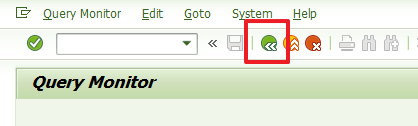
After this, the “Statistics Data for Query Runtime” will be displayed as shown in the image below.
Statistics: Frontend/Calculation Layer

Statistics: Aggregation Layer

Technical Information
In SAP BW, go to transaction “RSRT” (Query Monitor). Enter the technical name of the query.
Click on the “Technical Information” button.

Será mostrado uma tela com várias informações técnicas úteis da Query. Destaco as principais informações:
- Last Change
- Query Name (Internal ID)
- Name of Query Generated Program
- Read Mode
- Released for OLE DB for OLAP
- Calc. before Aggregation
- Formulas with Exception Aggregation
- Virtual Char./Key Figures
- Characteristics with hierarchy “as posted”
- Currency Translation in Query Definition
- Query can use aggregates
- Value Field Groups
- CIDs That Can Be Displayed
- Calculated CIDs
- Constant Selection
- Fiscal Year Variant
- Query Key Date
- Internal Business Volume Elimination
- Stock Coverage
- Access Type for Result Values: Master Data
- There are non-cumulative values with AVi
- There are non-cumulative values with LAST/FIRST
- There are Non-Cumulative Values with MAX or MIN
- InfoProviders Involved in the MultiProvider
- Number of Elements in Structure 1
- Selection Lines
- Free Chars.
- Basic Key Figures
- Formula Components
- Hierarchies
- Hierarchy Node
- Variables
- Query Generation Time

Tips for viewing query results in RSRT
For tips on different types of visualization of the BEx Query results in transaction RSRT, see this post SAP BW: How to generate Automatic Query for an InfoProvider↗
In conclusion, understanding how to view SQL statements and execution statistics for BW BEx Queries in SAP RSRT is invaluable for optimizing query performance and troubleshooting issues. By leveraging tools like RSRT, SAP users can gain deeper insights into query behavior, identify bottlenecks, and improve system efficiency. Whether you’re fine-tuning a query or ensuring optimal performance in your BI environment, these steps are essential for effective SAP BW management.
Feel free to leave any questions, suggestions, or comments in the comments section below, at the end of the page.
Keywords: SAP BW; How to view the generated SQL from a BW Bex Query; RSRT2; How to analyze SQL statements in SAP RSRT; SAP BW BEx Query performance tuning; Step-by-step guide to using RSRT for query analysis; SQL execution statistics in SAP BEx Queries; Troubleshooting slow BEx Queries in SAP BW; Mastering SAP RSRT: Optimize Your BEx Queries with SQL Insights; SAP RSRT Guide: Analyze and Boost Your BW Query Performance; How to Use SAP RSRT to Diagnose and Optimize BEx Queries; Enhance SAP BW Performance: RSRT and SQL Statement Analysis; Troubleshooting SAP BW Queries: A Deep Dive into RSRT and SQL; performance optimization in BW; query technical details; “SAP query debugging tips;
Did you like the content? Want to get more tips? Subscribe ↗ for free!
🔭See Also:
Want to learn more? Access our area 🎓🚀Training&Education↗
Follow on social media:
- How to Find Deleted VTTK Transport in SAP ECC
 Bem Vindo! | Welcome! By Felipe Lamounier, Minas Gerais, Brasil🇧🇷 – powered by 🙂My Easy B.I. 📑 Table of Contents: Introduction In this post, we will learn how to identify which transports were deleted in SAP ECC. We will also see how this data is removed from the VTTK table over a specific period. InContinuar lendo “How to Find Deleted VTTK Transport in SAP ECC”
 - How to identify SAP BW Process Chains with Recurring Errors
 This post by Felipe Lamounier focuses on identifying recurring errors in Process Chains (RSPC) within SAP BW over a 65-day period. It provides a structured approach to filter and analyze execution logs, aimed at improving resource management and system efficiency by addressing improperly executed chains. The analysis concludes with recommendations for maintaining or removing chains based on error frequency.
 - How to Retrieve SAP Table Metadata Efficiently
 This post by Felipe Lamounier provides a guide on efficiently retrieving metadata from SAP table fields using transaction SE16 and the DD03M view. Key elements include data element, data type, field length, and descriptions. Additionally, the post lists important SAP system tables, enhancing understanding of SAP metadata extraction.
 🙂My Easy B.I.